No-Code Integrations
Access Old Cars Data auction information without writing code.
- Google Sheets — Pull auction data into spreadsheets with custom formulas. Continue reading below.
- MCP Server — Query auction data with natural language in Claude, Cursor, and other AI tools.
Google Sheets Add-on
The Old Cars Data Google Sheets add-on lets you fetch auction listings and statistics directly in your spreadsheets. Use custom formulas to query data, build reports, and analyze auction trends -- all without leaving Google Sheets.
Features
- Custom spreadsheet functions for auction data
- Query builder sidebar for non-technical users
- Manual refresh functionality
- Secure API key storage
- No coding required
Installation
- Click the Install Add-on button above or visit the Google Workspace Marketplace
- Click "Install" and authorize the add-on when prompted
- Open any Google Sheet
- You'll see the "OCD API" menu in the menu bar
Configure API Key
Before using the formulas, you need to configure your API key.
- Get your API key from your profile settings
- In Google Sheets, click OCD API > Settings
- Enter your API key
- Click Save
Your API key is stored securely in your Google Sheet's properties and is never shared with third parties.
Available Formulas
The add-on provides two custom functions for accessing auction data and statistics.
OCD_AUCTIONS
Fetches auction listings matching your criteria. Returns a table with detailed auction information.
Syntax:
=OCD_AUCTIONS(make, [model], [year_min], [year_max], [price_min], [price_max], [status], [source], [keyword], [sort], [direction], [limit])Parameters:
| Parameter | Required | Description |
|---|---|---|
make | Yes | The make name |
model | No | The model name |
year_min | No | Minimum year |
year_max | No | Maximum year |
price_min | No | Minimum price |
price_max | No | Maximum price |
status | No | Auction status: "sold", "bid to", "reserve not met", "canceled", "unknown" |
source | No | Source platform filter |
keyword | No | Search keyword to match in title and description |
sort | No | Sort field: "date", "price", "year", "bids" (default: "date") |
direction | No | Sort direction: "asc", "desc" (default: "desc") |
limit | No | Maximum number of results, range 1-100 (default: fetch all) |
Examples:
Get all Porsche 911 auctions:
=OCD_AUCTIONS("Porsche", "911")Get sold Ferrari 308s from 1975-1985, limited to 50 results:
=OCD_AUCTIONS("Ferrari", "308", 1975, 1985, , , "sold", , , , , 50)Get auctions sorted by price (ascending):
=OCD_AUCTIONS("Toyota", "Land Cruiser", , , , , , , , , "price", "asc")OCD_STATS
Fetches price statistics for matching auctions, including average price, median price, and price trends.
Syntax:
=OCD_STATS(make, [model], [year_min], [year_max])Parameters:
| Parameter | Required | Description |
|---|---|---|
make | Yes | The make name |
model | No | The model name |
year_min | No | Minimum year |
year_max | No | Maximum year |
Examples:
Get statistics for all Ferrari 308s:
=OCD_STATS("Ferrari", "308")Get statistics for Porsche 911s from 1970-1975:
=OCD_STATS("Porsche", "911", 1970, 1975)The stats endpoint requires a paid plan. Free accounts cannot access statistics.
Using Formulas
Once you've installed the add-on and configured your API key, you can start using the formulas in your spreadsheet.
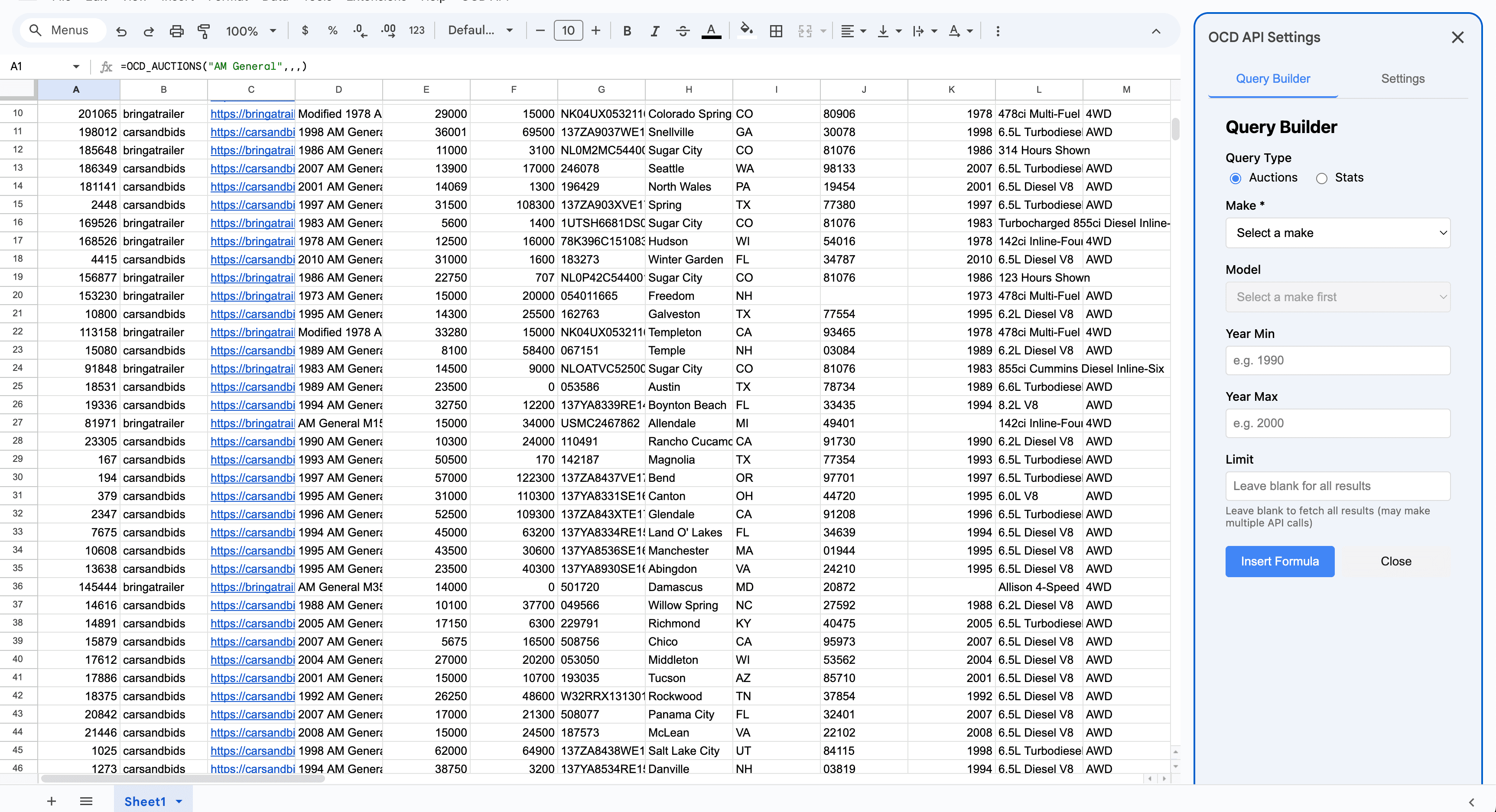
Basic Usage
- Click on any cell in your spreadsheet
- Type
=OCD_AUCTIONS(to start the formula - Enter your parameters, for example:
"Porsche", "911" - Press Enter
- The formula will fetch data and populate multiple rows and columns with auction information
Tips
- Leave optional parameters empty by using commas (e.g.,
=OCD_AUCTIONS("Porsche", , 1970)) - Use the
limitparameter to control how many results are returned - Formulas automatically refresh when you recalculate the sheet
- Large queries may take a few seconds to complete
Refreshing Data
To update your data, you can manually refresh all formulas in your spreadsheet.
- Click OCD API > Refresh All Data
- The add-on will re-evaluate all cells containing OCD functions
- A notification will show how many cells were refreshed
Formulas also automatically refresh when you recalculate the sheet (e.g., when you edit a cell or press Ctrl+R / Cmd+R).
Use Cases
Price Tracking
Track auction prices for specific makes and models over time. Use OCD_STATS to get average and median prices, then create charts to visualize trends.
Inventory Analysis
Build a comprehensive inventory of available auctions. Filter by location, price range, or condition to find vehicles matching your criteria.
Market Research
Analyze market trends by comparing sold vs. unsold auctions, tracking sell-through rates, and identifying popular configurations.
Limitations
- Results are limited to 2,000 rows per formula call
- Execution time limit of 25 seconds per formula (may result in incomplete data for very large queries)
- Limit parameter accepts values between 1 and 100
- Rate limits apply based on your subscription plan
Need Help?
- Getting Started
- MCP Server — Use AI tools instead of spreadsheets
- API Overview